
Yes — you can move to a .VEGAS domain without permanently losing SEO, but only if you execute a disciplined, prep-first migration: a complete 1:1 redirect map, staging checks that catch noindex and canonical issues before launch, and proper Search Console Change of Address work.
Three controls separate a clean migration from a catastrophic one:
- 1:1 redirect map: Every old URL must redirect to its closest equivalent on the new domain. Redirecting to the homepage is treated as a soft 404 and loses all page-level equity.
- Staging checks: Staging artifacts — leftover noindex tags or canonicals pointing to a staging hostname — are among the most common silent killers of a migration.
- Search Console work: Verify both old and new properties, submit fresh sitemaps, and file the Change of Address to forward ranking signals with a 180-day notification window.
Pro Tip: Google recommends changing one thing at a time — do the domain move first, then any CMS or structural redesign. Stacking changes multiplies debugging complexity.
Table of Contents
- When does migrating to a .VEGAS domain actually make sense?
- How to plan your domain migration: pre-launch through 90 days out
- Technical SEO checklist: what your engineer needs to get right
- What to monitor after launch — and how to triage drops
- .VEGAS-specific SEO and local branding considerations
- Rollback plan and communication checklist
- Handling multilingual and international SEO
- How domain age and history affect your SEO during migration
- Updating URL references in external platforms and marketing channels
- Key Takeaways
- The mistake most teams make — and what actually protects you
- Your .VEGAS domain is ready when you are
- Useful sources and recommended tools
When does migrating to a .VEGAS domain actually make sense?
Domain migrations should only happen when the strategic upside clearly outweighs the risk. A .VEGAS domain is a strong move when your business identity is Las Vegas — hospitality, weddings, entertainment, events, or retail tied to the city. The TLD itself signals local authority in a way that a generic .com never can.
Migrate when:
- You're rebranding to a Las Vegas identity and want the domain to match
- You're consolidating multiple TLDs under one authoritative .VEGAS address
- You're running event-driven campaigns (trade shows, conventions, residencies) where the domain is part of the marketing
- Your current domain is generic and the .VEGAS name is available and memorable
Don't migrate when:
- There's no clear business upside — a domain change for its own sake isn't worth the risk
- Your site has low domain authority and thin backlink profile (less equity to protect, but also less to recover with)
- You're facing a campaign deadline within 90 days
- Your team lacks the engineering hours to build and test a complete redirect map
Before committing, calculate your revenue-at-risk from a significant organic traffic dip. Get stakeholder sign-off. Inventory your URL count. The asymmetric downside of a botched migration is real: studies have found average recovery can take roughly 523 days, and about 17% of sites may never fully recover.
How to plan your domain migration: pre-launch through 90 days out
A migration is a project, not a task. Here's the ordered sequence:
- Full site crawl and baseline export — use Screaming Frog or a comparable crawler to capture every URL, title tag, H1, internal link, and structured data element. Export Search Console data: queries, pages, clicks, impressions, and average position.
- Backlink inventory — identify high-authority links pointing to your old domain. These are your most valuable assets to protect.
- Build the 1:1 redirect map — every URL with traffic, rankings, or backlinks gets mapped to its closest new equivalent. This document is the migration.
- Schema inventory — catalog all structured data types. Preserving schema during migration is now critical to retain AI citation equity in search overviews.
- Staging build and parity check — crawl the staging site and compare against your benchmark. Verify H1s, internal links, content, and structured data are intact.
- Verify GSC properties — set up and verify both old and new domain properties before launch day.
- Reduce DNS TTL — lower it to 300–600 seconds 24–48 hours before cutover to speed propagation.
- Migration day — deploy 301 redirects, remove staging noindex tags, rewrite all canonical tags to new .VEGAS URLs, submit new sitemaps, file Change of Address in Search Console.
- Post-migration (days 1–90) — monitor Search Console Index Coverage daily, watch analytics for landing-page-level drops, audit redirect map for top-traffic URLs, and begin backlink outreach.
- Days 90–180 — resolve any remaining redirect chains, update key external links and ad campaigns, confirm schema is firing correctly.
Timeline reality: Budget many months for full traffic recovery on a domain-level move. Well-executed migrations still typically see a 40–70% traffic dip before recovery begins, with recovery windows averaging 6–18 months unless redirects are near-perfect.
Technical SEO checklist: what your engineer needs to get right
The redirect map is the migration. Everything else supports it.
Redirects:
- Implement server-side 301 (or 308) permanent redirects for every URL. Permanent redirects pass link equity; 302/307 temporary redirects do not.
- Flatten redirect chains to single hops. Chains leak equity and slow crawl.
- Test a sample of top-traffic URLs immediately after launch.
| Old URL pattern | New URL | Expected status |
|---|---|---|
| olddomain.com/weddings | weddings.vegas | 301 |
| olddomain.com/events | yourdomain.vegas/events | 301 |
| olddomain.com/about | yourdomain.vegas/about | 301 |
| olddomain.com/blog/post-slug | yourdomain.vegas/blog/post-slug | 301 |
Canonical tags and metadata: All self-referencing canonicals must point to new .VEGAS URLs. Remove any staging-hostname canonicals before launch.
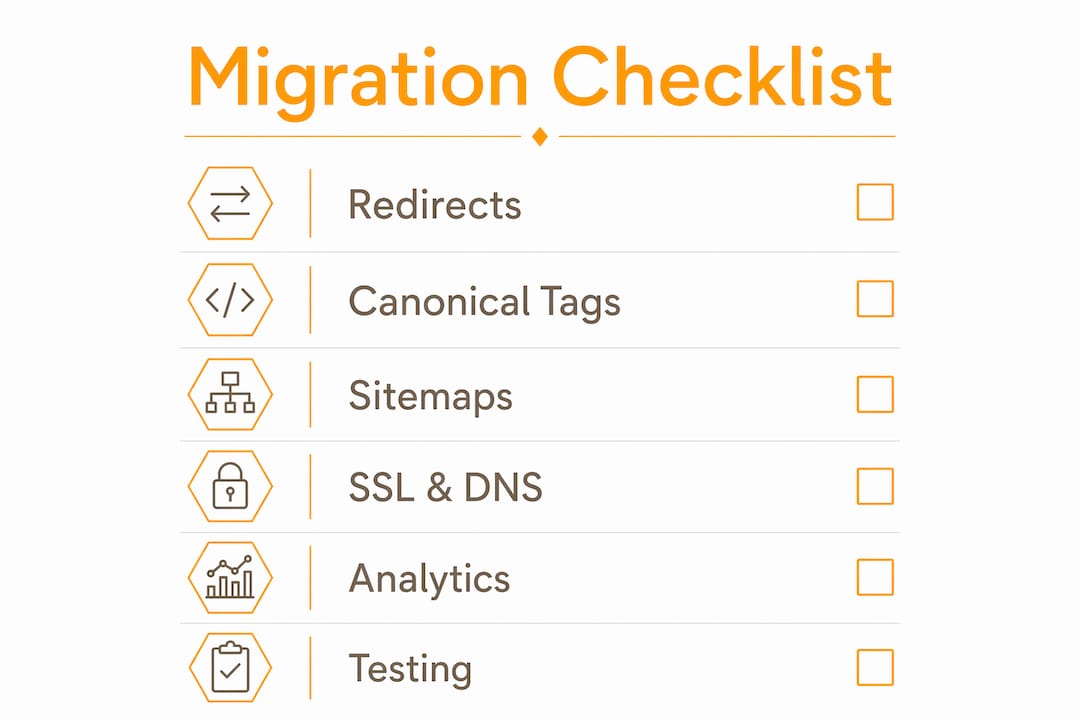
Sitemaps and robots.txt: Submit a fresh XML sitemap reflecting only new URLs. Confirm robots.txt allows Googlebot full access — staging rules sometimes accidentally carry over.
SSL and DNS: Confirm HTTPS works across every page with no mixed content. HTTP must 301 to HTTPS cleanly.

Analytics: Move analytics properties to the new domain, verify tag manager is firing, and preserve UTM landing pages in your redirect map so campaign attribution doesn't break.
Pro Tip: Run an automated redirect test against your full URL list the morning of launch — not just a spot check. One missed redirect on a high-traffic page can cost weeks of recovery.
What to monitor after launch — and how to triage drops
The first 14 days are your early-warning window.
Daily (days 1–14):
- Search Console Index Coverage and URL Inspection
- Sitemap processing status
- Organic sessions by landing page in Analytics
- Server logs for crawl patterns
Common issues and fixes:
- Redirect chains: flatten to direct 301s
- Staging noindex carried to production: remove immediately and request indexing
- Canonical conflicts: audit and rewrite to new domain
- robots.txt blocking: check and correct
- Missing schema: re-implement from your schema inventory
Triage process: Compare landing-page-level traffic against your pre-migration baseline. If a specific page drops and doesn't recover within two weeks, inspect its redirect, canonical, and internal link status first. A site-wide drop usually points to a robots.txt or noindex issue.
Monitoring cadence:
- Days 0–14: daily Search Console and Analytics review
- Days 15–60: weekly crawl reports, redirect chain audits, backlink resolution
- Days 61–180: monthly schema checks, citation updates, ranking trend review
Escalation criteria: If organic traffic hasn't begun recovering by week 8, pause new marketing campaigns and conduct a full technical audit before spending more on acquisition.
.VEGAS-specific SEO and local branding considerations
A .VEGAS domain does more than signal geography — it tells Google, local directories, and your customers exactly where you operate. But the domain alone isn't enough.
- Google Business Profile: Update your GBP listing with the new .VEGAS URL the same day you launch. Inconsistent NAP (name, address, phone) across your GBP and website is a local signal killer.
- Local citations: Update every directory listing — Yelp, TripAdvisor, local event calendars, Las Vegas Chamber of Commerce — to reflect the new domain.
- Schema types: Implement Organization, LocalBusiness, and Event schema on relevant pages. Event schema is particularly valuable for Las Vegas-specific campaigns tied to conventions, shows, or seasonal promotions.
- Branded slugs: Keep recognizable URL slugs when you migrate. If your old site had /weddings, keep /weddings on the new domain. WEDDINGS.VEGAS is a strong example of branding continuity — the domain itself carries the brand signal, and the slug reinforces it.
- Event-driven campaigns: .VEGAS domains pair naturally with Las Vegas event marketing. Build dedicated landing pages for major events and submit them to local event aggregators with the new URL.
Improving your Google Maps visibility alongside your domain migration compounds the local SEO benefit.
Rollback plan and communication checklist
A rollback plan isn't pessimism — it's professionalism. Before launch, document the exact steps to revert DNS to the old domain if a critical issue surfaces within the first 48 hours. Keep your old hosting active for at least 30 days post-launch.
Communication checklist before and after launch:
- Notify key partners and high-authority backlink owners of the domain change and request link updates
- Update all paid advertising campaigns (Google Ads, Meta) with new destination URLs
- Update email signatures, business cards, and printed materials
- Notify your email service provider so campaign links resolve correctly
- Post a site announcement or redirect notice for returning visitors
- Keep old domain redirects active for at least 12–24 months so external links continue resolving
Handling multilingual and international SEO
Most .VEGAS domain migrations target a US audience, but Las Vegas draws international visitors. If your site serves multiple languages, implement hreflang tags on the new domain to signal language and regional targeting to Google. A page targeting English-speaking US audiences uses hreflang="en-us". Carry these tags over exactly from the old domain — missing or incorrect hreflang after migration can cause international traffic to drop independently of the main ranking recovery.
If you're consolidating a multilingual site onto a single .VEGAS domain, map each language variant URL individually in your redirect map. Never redirect all language variants to a single English-language homepage.
How domain age and history affect your SEO during migration
Your old domain's age and history represent years of trust signals Google has accumulated. When you migrate, those signals don't transfer instantly — they follow the redirect chain over weeks and months as Googlebot recrawls and reprocesses. A domain with a strong backlink profile and clean history will recover faster than one with thin authority.
One practical implication: if your old domain has toxic backlinks, disavow them before migration. Carrying a bad backlink profile to a new domain imports the problem. Conversely, a domain with strong editorial links is your biggest asset. Protect it with a complete redirect map and backlink outreach to update links to the new .VEGAS URL.
Updating URL references in external platforms and marketing channels
Redirects handle organic traffic, but direct URL references in external platforms won't update themselves. Work through this list systematically after launch:
- Google Ads and Meta Ads: update all destination URLs and landing page URLs
- Email marketing platforms: update template links and any automated sequences
- Social media profiles and bio links
- Third-party review platforms (Yelp, TripAdvisor, Google Business Profile)
- Press releases and media coverage where you can request updates
- Partner and affiliate links
- Any API integrations or webhooks using the old domain
Key Takeaways
A successful domain migration to .VEGAS depends on preparation — the redirect map, staging checks, and Search Console work done before launch day determine whether you recover in weeks or years.
| Point | Details |
|---|---|
| 1:1 redirect map is non-negotiable | Every URL with traffic or backlinks must redirect to its closest new equivalent — not the homepage. |
| Staging checks prevent silent failures | Remove noindex tags and staging-hostname canonicals before DNS cutover or the live site may be invisible. |
| File Change of Address in Search Console | Use the tool after verifying both properties; it forwards ranking signals with a 180-day window. |
| Keep old redirects live 12–24 months | External links continue resolving correctly and link equity keeps transferring during the recovery window. |
| Getyour for .VEGAS acquisition and support | Getyour has been placing businesses on .VEGAS domains since 2009, with client examples like WEDDINGS.VEGAS demonstrating branding continuity. |
The mistake most teams make — and what actually protects you
The conventional wisdom says "just set up 301 redirects and you're fine." That's true as far as it goes, but it misses where migrations actually break. The real failure point is almost always the long-tail: the hundreds of older URLs that were quietly pulling in traffic, never featured in the navigation, never in the top-10 pages report. Those get left to 404, and everything they'd built up disappears.
The second recurring mistake is treating the staging environment as a formality. Staging noindex tags carried to production have deindexed entire sites. It's a five-minute check that teams skip because they're focused on the big launch tasks. Don't skip it.
For high-revenue sites, a complex multilingual setup, or a large URL inventory, specialist help pays for itself. Getyour has been working with .VEGAS domains since 2009 — the experience with clients like WEDDINGS.VEGAS shows what branding continuity looks like when the migration is done right. If your team is stretched, or if the revenue-at-risk calculation makes you nervous, that's the signal to bring in external expertise before launch, not after.
Your .VEGAS domain is ready when you are
The hardest part of a .VEGAS migration isn't the technical work — it's knowing which domain to move to and having the right acquisition in place before you start. Getyour has been the go-to source for premium .VEGAS domain leasing, sales, and auctions since 2009. Whether you want to lease a .VEGAS domain for a campaign or acquire one outright, the inventory and the expertise are there.

WEDDINGS.VEGAS is one example of what a well-chosen .VEGAS domain does for a brand — the domain itself becomes the marketing. If you're ready to move, make an offer or browse available domains and get your migration started on the right foundation.
Useful sources and recommended tools
- Google Search Central: Site moves and migrations — primary guidance on staged rollouts and the change-one-thing-at-a-time principle
- Google Search Console: Change of Address tool — required for domain-level moves; 180-day notification window
- SEO Domain Migrations (Joost) — practitioner-level guidance on redirect mapping and prep-first approach
- SEO Site Migration 2026 Playbook — covers schema preservation, staging pitfalls, and recovery statistics
- Website Migration SEO Checklist — redirect retention policy, traffic dip ranges, and post-migration monitoring
- Recommended tools: Screaming Frog (site crawler), Google Search Console (index coverage and URL inspection), Google Analytics 4 (landing-page traffic baseline), Ahrefs or Majestic (backlink inventory and outreach)
- Schema note: Preserve all structured data types during migration. Schema is now a KPI for AI search citation equity — losing it costs visibility in generative search overviews, not just traditional rankings.