
The domain transfer process is defined as moving your domain registration from one registrar to another while retaining full ownership of the domain name. Businesses and individuals pursue this for better pricing, superior support, or stronger brand alignment. Two governing elements control every transfer: ICANN policies and the EPP authorization code system. Get these right, and the entire migration runs smoothly. Miss either one, and you could lose days or weeks to preventable delays.
What prerequisites do you need before starting a domain transfer?
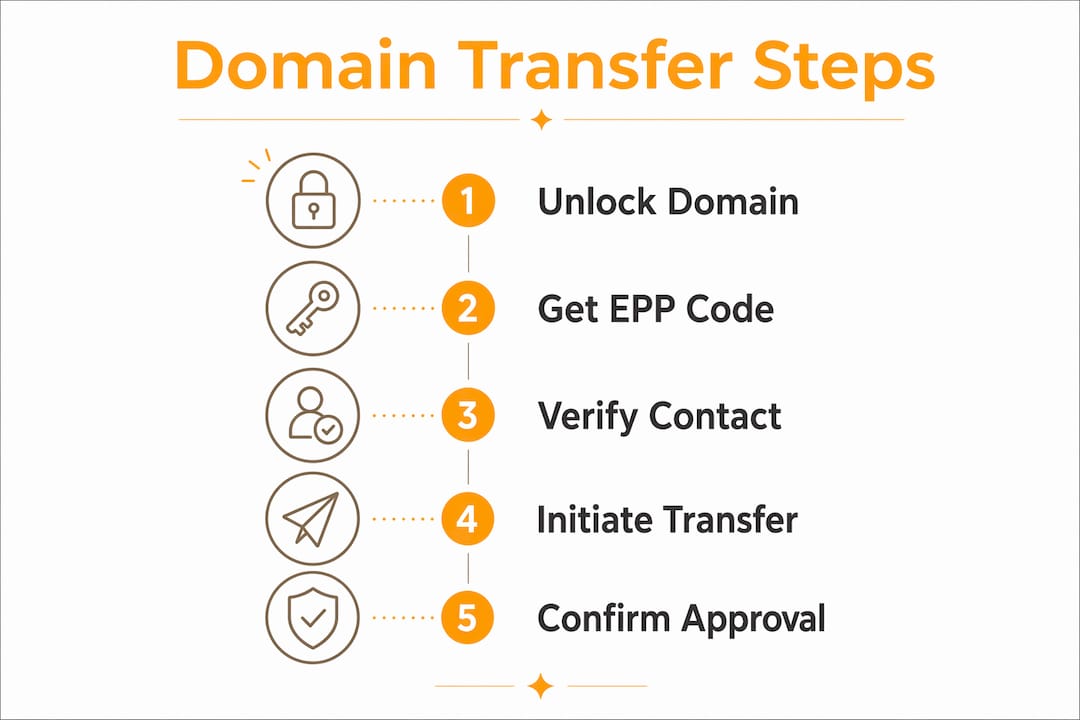
Three non-negotiable prerequisites exist before any transfer can begin: unlocking the domain, obtaining a valid EPP code, and verifying your admin email. Skip any one of these and the transfer stalls immediately. Think of them as the three keys that open the same lock.
Unlock the domain from clientTransferProhibited status
Every domain registered through an ICANN-accredited registrar carries a default lock called clientTransferProhibited. This status blocks outgoing transfers as a security measure. You must log into your current registrar's control panel and disable this lock before initiating any transfer request. Some registrars call it "domain lock" or "transfer lock," but the function is identical.
Obtain your EPP authorization code
The EPP authorization code acts as a security handshake between your current registrar and the gaining registrar, preventing unauthorized domain hijacking. Most modern registrars generate this code instantly through their control panel. Legacy registrars sometimes require you to contact their support team directly, which can add one to three business days to your timeline. Request the code only when you are ready to transfer, because EPP codes expire after a set period and you may need to request a new one.

Verify and update your administrative contact email
An outdated admin email can halt the entire transfer. Both the EPP code and transfer approval emails route to this address. If the inbox no longer exists, you will never receive the confirmation needed to complete the move. Update this email before you do anything else.
Pro Tip: Be careful when updating your admin email. An administrative email change can itself trigger a 60-day ICANN transfer lock, so make that update well before you plan to transfer.
Here is a quick reference for the core prerequisites:
| Prerequisite | Action Required | Common Pitfall |
|---|---|---|
| Domain lock status | Disable clientTransferProhibited in control panel | Forgetting to re-check after a support ticket |
| EPP authorization code | Request from registrar control panel or support | Code expires before transfer is initiated |
| Admin contact email | Confirm inbox is active and accessible | Outdated email blocks all confirmation messages |
| ICANN 60-day lock | Verify domain age and no recent registrant changes | Recent ownership edits restart the lock window |
| DNS records backup | Export all current DNS records before transfer | DNS settings lost during registrar migration |
ICANN policies impose a 60-day transfer lock after initial domain registration or any change to registrant details. This rule catches many businesses off guard when they update ownership information and then immediately try to transfer. Plan your timeline around this window.
How do you execute the domain transfer step by step?
Active work to initiate a transfer takes roughly 30 minutes, but the full process can extend up to 10 days depending on how quickly your current registrar responds. That gap between your effort and the final outcome is where most confusion happens.
-
Go to the gaining registrar. Enter your domain name in their transfer search or transfer initiation tool. The gaining registrar is the one you want to move your domain to.
-
Enter your EPP authorization code. Paste the code exactly as provided. Even one incorrect character causes the transfer to fail. Copy and paste rather than typing it manually.
-
Pay the transfer fee. Most domain transfers require payment equal to one standard annual registration fee for your domain extension. This payment typically includes a one-year renewal, so your domain expiration date extends by 12 months.
-
Approve the transfer via email. Your current registrar sends a confirmation email to your admin contact address. Clicking "approve" in that email accelerates the process significantly. If you do nothing, the transfer completes automatically after a waiting period, but approval speeds it up.
-
Monitor your domain management dashboard. Both registrars display transfer status in their control panels. Check daily. A status of "pending" is normal. "Failed" requires immediate action, usually a new EPP code or a support call.
-
Confirm completion. Once the gaining registrar confirms the transfer, verify that your DNS records, nameservers, and email routing are intact.
Pro Tip: If your domain is hosted on a website builder platform, you may need to first transfer it to a standard registrar before moving it to your preferred destination. Platforms like Shopify and Wix use intermediate registrar arrangements that add one extra step to the process.
Domain transfers do not automatically migrate your DNS records or nameservers. The gaining registrar takes over management, but your actual DNS configuration stays wherever it was pointed. Prepare for this by backing up your DNS records and replicating them at the new registrar or an external DNS host before the transfer completes.
What are common challenges during domain transfers?
Most transfer failures trace back to a small set of preventable problems. Knowing them in advance saves you real time and real money.
- Outdated admin contact email. This is the single most common cause of failed transfers. The fix is simple: verify the email before you start.
- Expired EPP codes. EPP codes have a limited validity window. If you requested the code weeks ago and are only now initiating the transfer, request a fresh one.
- ICANN 60-day lock confusion. Businesses often update their registrant contact details and then wonder why the transfer is blocked. The lock resets every time registrant information changes.
- Legacy registrar delays. Some older registrars require direct support contact to release the EPP code. Budget extra time when dealing with these providers.
- DNS and email downtime. A transfer does not move your DNS records automatically. Without preparation, your website and email can go dark for hours during propagation.
- Country-code domain exceptions. Extensions like .uk use entirely different transfer systems, which can catch you off guard if you assume the standard EPP process applies.
Reducing your DNS TTL (Time to Live) values 24–48 hours before the transfer is one of the most effective ways to minimize downtime. Lower TTL values mean DNS changes propagate faster across the internet, so any updates made during the transfer take effect quickly rather than sitting in cache for hours.
The most overlooked issue is DNS continuity. Domain transfer only changes registrar management. Your website, email, and other services depend on DNS records that exist independently of the registrar. If those records are not replicated at the new registrar before the transfer completes, services go offline. Export every DNS record before you start and confirm they are live at the new registrar before the transfer finalizes.
How do domain extensions affect the transfer process?
Not all domain extensions follow the same rules. Generic top-level domains (gTLDs) like .com, .net, and .org all follow standard ICANN EPP code procedures. Country-code top-level domains (ccTLDs) operate under their own registries and often have unique requirements.
| Domain Extension | Transfer Method | Notable Requirement |
|---|---|---|
| .com, .net, .org | EPP authorization code | Standard ICANN 60-day lock applies |
| .uk | IPS tag change | No EPP code; contact current registrar to update tag |
| .io, .co | EPP code with registry approval | Some require additional verification steps |
| .us | EPP code | Must maintain US nexus requirement |
| Uncommon ccTLDs | Registry-specific process | Check the individual registry's documentation |
Country-code domains like .uk use a system called IPS tags instead of EPP codes. To transfer a .uk domain, you contact your current registrar and ask them to update the IPS tag to the gaining registrar's tag. The gaining registrar then claims the domain. No authorization code changes hands. This process is faster in some cases but requires knowing the exact IPS tag string for the new registrar.
Transfer fees and timelines also vary by extension. Some ccTLD registries charge higher transfer fees than standard gTLDs. A few restrict transfers entirely during certain periods, such as within 30 days of expiration. Always check the specific registry's documentation for any extension outside the standard .com family before initiating a transfer.
Key Takeaways
A successful domain ownership transfer depends on three prerequisites, a clear execution sequence, and proactive DNS preparation to prevent service interruptions.
| Point | Details |
|---|---|
| Unlock and get the EPP code first | Disable clientTransferProhibited and request your EPP code before anything else. |
| Verify your admin email | Confirmation emails route to this address; an inactive inbox stops the transfer cold. |
| Budget up to 10 days | Active work takes 30 minutes, but full completion can take up to 10 days. |
| Back up DNS records | Transfer changes your registrar, not your DNS; replicate records at the new registrar before transfer. |
| Know your extension's rules | ccTLDs like .uk use IPS tags, not EPP codes; check registry rules for any non-standard extension. |
What I've learned from watching domain transfers go wrong
After years of working in the domain space, the pattern I see most often is this: businesses treat the domain transfer guide as a checklist and rush through it. They unlock the domain, grab the EPP code, and initiate the transfer without ever checking whether the admin email is still active. Then they wait. And wait. And eventually realize the confirmation email went to an inbox that was deleted two years ago.
The second mistake I see constantly is ignoring DNS preparation. People assume the transfer moves everything. It does not. Your registrar holds your domain registration. Your DNS records live wherever you pointed your nameservers. Those are two separate things. A business can complete a perfect transfer and still take their website offline for 12 hours because nobody replicated the DNS records at the new registrar.
My honest advice: do the DNS work first. Export every record, build them out at the new registrar, lower your TTL values 48 hours before the transfer, and only then initiate the move. If you are managing a .VEGAS domain or any premium branded domain, the stakes are higher because your brand identity lives at that address. Treat it accordingly.
The ICANN 60-day lock rule also trips up more businesses than you would expect. They update their registrant contact details, which is the right thing to do for accuracy, and then immediately try to transfer. The lock kicks in and they think something is broken. Nothing is broken. They just need to wait out the window. Plan your transfer before making registrant changes, not after.
— Shawn
Getyour.Vegas: your next move after the transfer
Once your domain transfer is complete, the real opportunity begins. Getyour specializes in .VEGAS domain names, giving businesses and entrepreneurs in Las Vegas a branded online identity that stands out in one of the most competitive markets in the country.

Whether you are looking to lease a premium .VEGAS domain or acquire one through auction, Getyour offers domain leasing, sales, and auction services built specifically for the Las Vegas market. Clients like WEDDINGS.VEGAS show what a sharp domain does for brand recognition. If you are ready to claim your space in Vegas, explore available .VEGAS domains and see what is waiting for you.
FAQ
What is the domain transfer process?
The domain transfer process moves your domain registration from one ICANN-accredited registrar to another. It requires unlocking the domain, obtaining an EPP authorization code, and approving the transfer via your admin contact email.
How long does a domain transfer take?
Active setup takes about 30 minutes, but the full transfer can take up to 10 days depending on how quickly the current registrar processes the release.
What is an EPP authorization code?
An EPP authorization code is a unique security credential your current registrar provides to authorize the transfer. It acts as a handshake between registrars to prevent unauthorized domain hijacking.
Can I transfer a domain that was recently registered?
No. ICANN enforces a 60-day lock after initial registration or any change to registrant details, blocking transfers during that window.
Does a domain transfer affect my website or email?
A transfer changes your registrar but does not automatically move DNS records. Back up and replicate your DNS settings at the new registrar before the transfer completes to avoid downtime.